
All-in-One Percentage Calculator
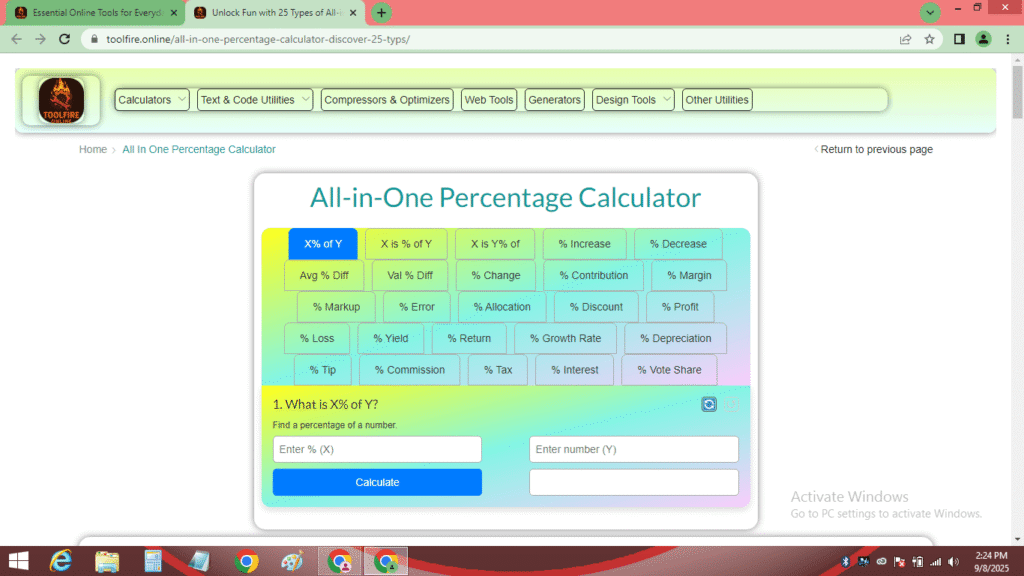
1. What is X% of Y?
2. X is what percent of Y?
3. X is Y% of what?
4. Percentage Increase
5. Percentage Decrease
6. Average Percentage Difference
7. Value Percentage Difference
8. Percentage Change Over Time
9. Percentage Contribution
10. Percentage Margin
11. Percentage Markup
12. Percentage Error
13. Percentage Allocation
14. Percentage Discount
15. Percentage Profit
16. Percentage Loss
17. Percentage Yield
18. Percentage Return
19. Percentage Growth Rate
20. Percentage Depreciation
21. Percentage Tip
22. Percentage Commission
23. Percentage Tax
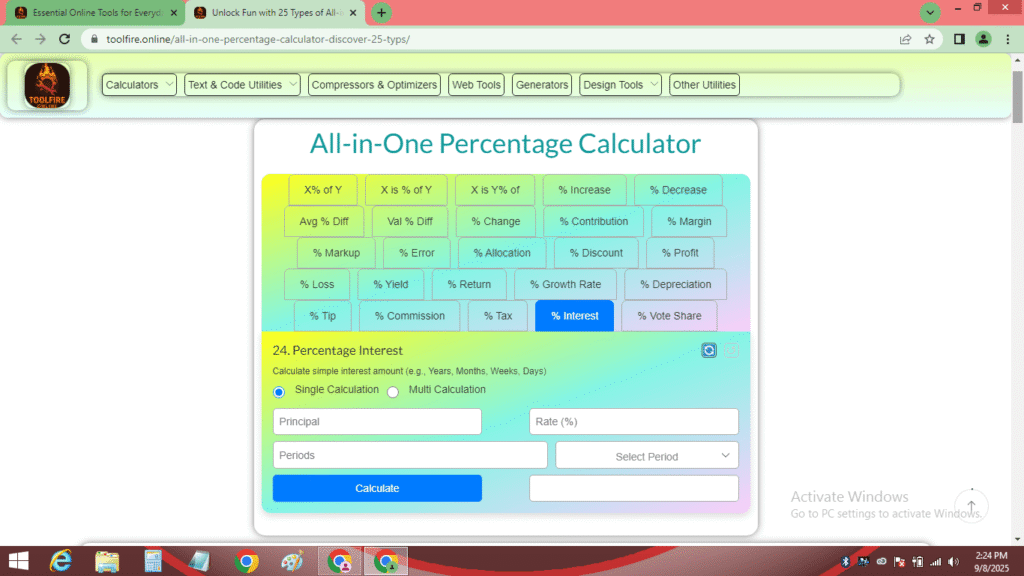
24. Percentage Interest
25. Percentage Vote Share
Enter PDF Details
User Feedback
🔥 Sharing for Fire
Copy Tool Link
Suggest Your Idea
How did you like this tool?
Please share your feedback to help us improve
🔥 Sharing for Fire
Copy Tool Link
Suggest Your Idea
Bookmark Tool
Master Your Calculations with the All-in-One Percentage Calculator
Welcome to the All-in-One Percentage Calculator, the ultimate tool designed to simplify a wide range of percentage-based calculations with unmatched precision and ease. Whether you’re a student solving math problems, a business owner computing profit margins, or someone managing personal finances, this All-in-One Percentage Calculator is your go-to solution. With over 20 calculation types, a responsive design, and advanced features like undo functionality and PDF export, this tool is perfect for users of all skill levels. In this comprehensive guide, we’ll dive into the full functionality, key features, real-world applications, and practical tips for using the All-in-One Percentage Calculator, along with answers to frequently asked questions and how to leverage it for maximum productivity.
What is the All-in-One Percentage Calculator?
The All-in-One Percentage Calculator is a powerful online tool that performs over 20 types of percentage calculations, from basic computations like finding a percentage of a number to advanced financial metrics like compound interest and percentage margin. Its intuitive interface ensures that users can perform calculations quickly, whether they’re calculating percentage increase for business growth or percentage contribution for data analysis. Built with accessibility in mind, the All-in-One Percentage Calculator works seamlessly across devices—desktops, tablets, and smartphones—making it a versatile choice for anyone, anywhere.
This tool is optimized for both beginners and professionals, offering robust features like input validation, a results history table, and sharing options via platforms like WhatsApp and LinkedIn. Whether you’re a student learning to calculate percentage of number or a professional analyzing percentage margin, the All-in-One Percentage Calculator delivers accurate results every time.
Key Features of the All-in-One Percentage Calculator
The All-in-One Percentage Calculator is packed with features that make it stand out as a comprehensive and user-friendly tool. Here’s what you get:
- Versatile Calculation Types: Perform calculations like percentage increase, percentage decrease, percentage contribution, percentage margin, compound interest, and more, covering over 20 scenarios.
- Responsive Design: Use the All-in-One Percentage Calculator on any device with a consistent, mobile-friendly experience, perfect for on-the-go calculations.
- Results History Table: View all your calculations in an organized table, making it easy to track and compare results.
- Undo and Reset Functionality: Correct mistakes with the undo icon (↺) to restore recently deleted results or reset individual calculators with the reset icon (🔄).
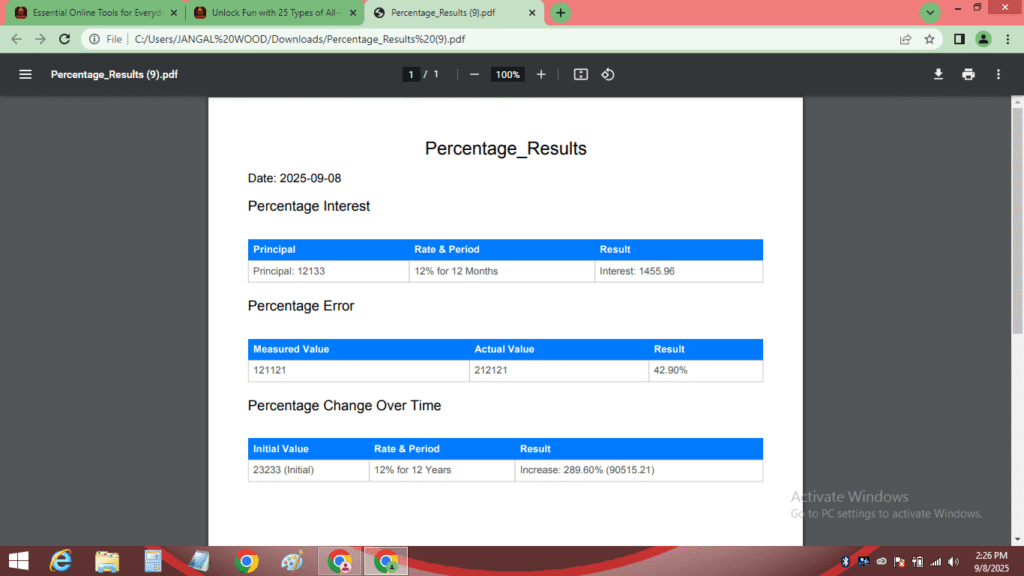
- PDF Export: Generate professional PDF reports of your calculations, customizable with file names and dates, ideal for record-keeping or presentations.
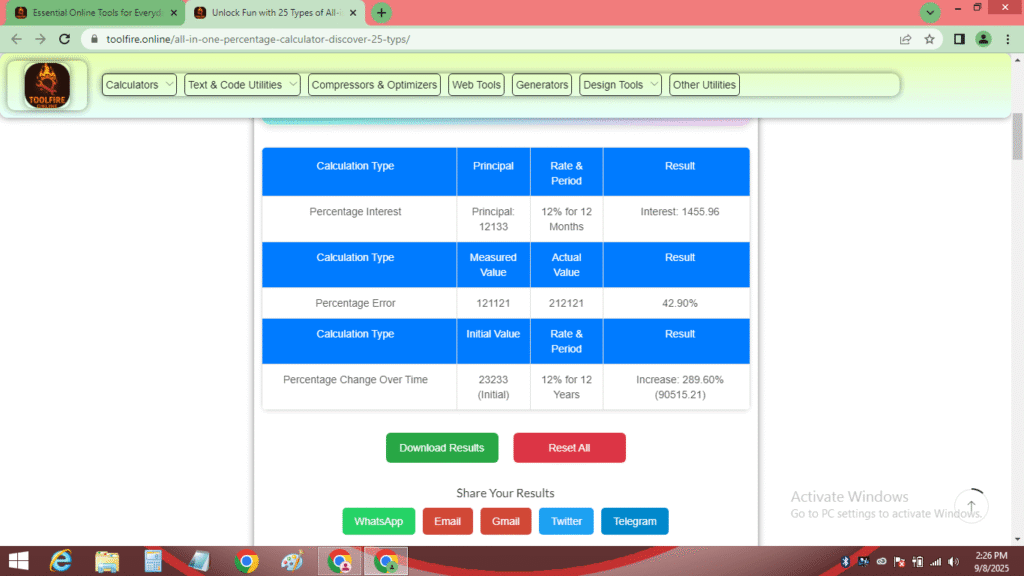
- Social Sharing: Share results via WhatsApp, Email, Gmail, Twitter, or Telegram, or discuss your calculations on platforms like LinkedIn for professional networking.
- Input Validation: Built-in checks ensure accurate inputs, preventing errors like invalid or negative numbers where not allowed.
- Accessible Interface: Clear labels, tooltips, and a tabbed layout make the All-in-One Percentage Calculator easy to navigate for all users.
These features make the All-in-One Percentage Calculator a must-have tool for anyone working with percentages, saving time and ensuring accuracy.
Who Can Benefit from the All-in-One Percentage Calculator?
The All-in-One Percentage Calculator is designed for a diverse audience, including:
- Students: Simplify math homework by calculating percentage of number or percentage difference effortlessly. Learn more about percentage concepts on Quora, where users share educational insights.
- Business Professionals: Compute financial metrics like percentage margin or percentage commission to make data-driven decisions. Share your insights with peers on LinkedIn.
- Teachers and Educators: Verify student calculations or create teaching materials using the calculator’s accurate results.
- Freelancers and Entrepreneurs: Calculate percentage increase for project growth or percentage contribution for client reports, and showcase your work on Medium.com.
- Personal Finance Enthusiasts: Plan budgets, calculate savings interest, or determine loan percentages with ease. Watch tutorials on YouTube for personal finance tips.
- Researchers and Analysts: Perform statistical calculations like percentage error or percentage allocation for data-driven insights.
No matter your role, the All-in-One Percentage Calculator is intuitive enough for beginners yet powerful enough for advanced users.

How to Use the All-in-One Percentage Calculator: A Step-by-Step Guide
Using the All-in-One Percentage Calculator is simple and efficient. Follow these steps to get started:
- Choose a Calculator: Navigate through the tabs to select the desired calculation type, such as percentage increase, percentage discount, or compound interest.
- Input Values: Enter the required values (e.g., X, Y, or Z for certain calculators) in the designated fields. The tool validates inputs to ensure accuracy.
- Select Options: For advanced calculations like compound interest, choose period types (days, weeks, months, years) or modes (single or multiple results).
- Calculate Results: Click the “Calculate” button to view instant results displayed below the input fields.
- Track and Manage Results:
- History Table: All calculations are saved in a results table for easy reference.
- Undo/Reset: Use the undo icon (↺) to restore deleted results or the reset icon (🔄) to clear inputs.
- Export to PDF: Download your results as a PDF for professional documentation.
- Share Results: Share via social platforms like Facebook or Telegram for collaboration.
- Explore Resources: For tips on using percentage calculators, check out tutorials on YouTube or read articles on Medium.com.
This guide ensures you can harness the full power of the All-in-One Percentage Calculator for any task.
Additional Benefits of the All-in-One Percentage Calculator
Beyond its core functionality, the All-in-One Percentage Calculator offers unique benefits:
- Time-Saving: Perform complex calculations in seconds, eliminating manual errors.
- Educational Value: Learn percentage concepts through practical use, supported by resources on platforms like About.me.
- Collaboration-Friendly: Share results instantly with colleagues or peers via social platforms, enhancing teamwork.
- Customizable Outputs: Export results as PDFs for professional reports or presentations, ideal for business or academic settings.
- Error-Free Calculations: Built-in validation ensures accurate inputs, reducing the risk of mistakes.
These benefits make the All-in-One Percentage Calculator a game-changer for anyone dealing with percentages.
Real-World Applications and Examples
To illustrate the power of the All-in-One Percentage Calculator, here are some practical examples:
- Student Scenario: A student needs to calculate percentage of number for a math assignment. Inputting 25% and 400 yields 100, saving time and ensuring accuracy. Learn more about percentage concepts on Quora.
- Business Use Case: A retailer wants to calculate percentage margin for a product with a cost price of $60 and a selling price of $100. The result is 40%, helping them optimize pricing strategies.
- Personal Finance: An individual calculating compound interest on a $5000 savings account at 4% annual interest for 5 years gets $6083.26, aiding financial planning. Explore more finance tips on About.me.
- Freelancer Example: A freelancer calculates a 15% commission on a $2000 project, resulting in $300, and shares the results with clients via Facebook.
- Analyst Scenario: A researcher computes percentage contribution to analyze survey data, finding that 200 responses out of 800 represent 25% of the total.
These examples show how the All-in-One Percentage Calculator applies to real-world scenarios across education, business, and personal finance.
Detailed Breakdown of Calculations
The All-in-One Percentage Calculator supports a wide range of calculations, each tailored to specific use cases. Here’s a detailed look at key calculations:
- Percentage of a Number (Calculate Percentage of Number): Find a percentage of a value. Example: What is 15% of 200? Result: 30. Useful for budgeting or sales calculations.
- Percentage Contribution (Calculate Percentage Contribution): Determine what percentage one number is of another. Example: 40 is what % of 160? Result: 25%. Ideal for data analysis or market share calculations.
- Percentage Increase/Decrease (Calculate Percentage Increase): Measure the percentage change between two values. Example: From 100 to 130, the increase is 30%. Perfect for tracking business growth or stock prices.
- Percentage Margin (Calculate Percentage Margin): Calculate profit margins. Example: Cost price is 50, selling price is 75, margin is 33.33%. Essential for retail and business analytics.
- Compound Interest (Calculate Compound Interest): Compute interest over time with customizable periods. Example: $1000 at 5% annual interest for 3 years yields $1157.63. Great for investment planning.
Additional calculations include percentage error, percentage allocation, percentage discount, percentage profit, percentage loss, percentage yield, percentage return, percentage growth rate, percentage depreciation, percentage tip, percentage commission, percentage tax, percentage interest, and percentage vote share. Each calculator is designed to address specific scenarios, making the All-in-One Percentage Calculator a versatile tool.
Tips for Maximizing Your Experience
- Validate Inputs: Ensure all inputs are valid to avoid errors, with clear error messages guiding you.
- Use the History Table: Review past calculations to track trends or compare results.
- Explore Tutorials: Watch percentage calculation tutorials on YouTube for additional learning.
- Share Strategically: Use sharing options to collaborate with peers or clients on platforms like Facebook.
- Experiment with Calculators: Try different calculators to discover new applications for your needs.

Frequently Asked Questions (FAQ)
1. What calculations can the All-in-One Percentage Calculator perform?
- The All-in-One Percentage Calculator supports over 20 calculations, including percentage increase, percentage contribution, percentage margin, compound interest, and more, catering to diverse needs.
2. Is the All-in-One Percentage Calculator free?
Yes, the All-in-One Percentage Calculator is 100% free, with all features like PDF export and sharing available without any cost.
3. How do I undo or reset calculations?
Use the reset icon (🔄) to clear a calculator’s inputs and results, or the undo icon (↺) to restore the last deleted result for any calculator.
4. Can I use the All-in-One Percentage Calculator on mobile devices?
Absolutely, its responsive design ensures seamless use on smartphones, tablets, and desktops.
5. How do I share or export my results?
Share results via WhatsApp, Email, or platforms like LinkedIn, or export them as a PDF using the “Download PDF” button.
6. Who can benefit from this calculator?
Students, business professionals, freelancers, educators, and anyone needing percentage calculations can use the All-in-One Percentage Calculator effectively.
Conclusion
The All-in-One Percentage Calculator is the ultimate tool for anyone needing quick, accurate, and versatile percentage calculations. From calculating percentage increase to percentage contribution, this tool covers it all with a user-friendly interface, advanced features like undo and PDF export, and seamless sharing options. Whether you’re a student, professional, or casual user, the All-in-One Percentage Calculator empowers you to tackle percentage problems with confidence.
Learn more about the team behind this innovative tool on our About Us page. For any assistance or inquiries, feel free to reach out via our Contact page. We prioritize your data security, so be sure to review our Privacy Policy page for details. Additionally, explore a wide range of other useful tools on our All Calculators to enhance your productivity further.
Explore the full potential of the All-in-One Percentage Calculator today, share your results on platforms like LinkedIn or Facebook, and elevate your productivity with this all-in-one solution!