
Profit and Loss Calculator
User Feedback
🔥 Sharing for Fire
Copy Tool Link
Suggest Your Idea
How did you like this tool?
Please share your feedback to help us improve
🔥 Sharing for Fire
Copy Tool Link
Suggest Your Idea
Bookmark Tool
Profit and Loss Calculator: Your Free Tool to Calculate Business Profit
Running a business or managing finances requires precision, and a Profit and Loss Calculator is the perfect tool to simplify your financial calculations. Whether you’re a small business owner, freelancer, or student analyzing business scenarios, this free online profit and loss calculator offers a quick, accurate, and user-friendly way to calculate business profit or loss. Packed with features like tax calculations, discount adjustments, and PDF export options, this tool is designed to help you make informed financial decisions. Let’s explore how this easy profit loss tool can transform your workflow.
Why Use a Profit and Loss Calculator?
A profit and loss calculator helps you determine whether your business or project is profitable by analyzing costs, revenues, and other financial factors. Unlike complex accounting software, this free online profit and loss calculator is intuitive and requires no downloads, making it ideal for quick calculations. Whether you’re calculating per-unit profits or total project outcomes, this tool delivers clear results in seconds. Plus, its responsive design ensures it works seamlessly on desktops, tablets, and smartphones.
For tips on managing business finances, check out resources on Medium for insightful articles or join discussions on Quora to learn from experts.
Key Features of This Profit and Loss Calculator
This calculate business profit tool comes with a robust set of features to meet diverse needs:
- Per-Unit or Total Project Calculations: Choose between per-unit or total project modes to suit your business model.
- Multiple Currency Support: Calculate in INR (₹), USD ($), EUR (€), or GBP (£) for global applicability.
- Tax and Discount Adjustments: Input GST or tax percentages and discounts to get accurate net revenue figures.
- Additional Expenses and Commissions: Factor in extra costs like overheads or commissions for a comprehensive analysis.
- Return Adjustments: Account for returned units or percentage-based returns to adjust your final profit.
- Profit Margin Target Tracking: Set a target profit margin and see if your results meet, exceed, or fall below it.
- Date and Invoice Tracking: Add dates and invoice IDs for organized record-keeping.
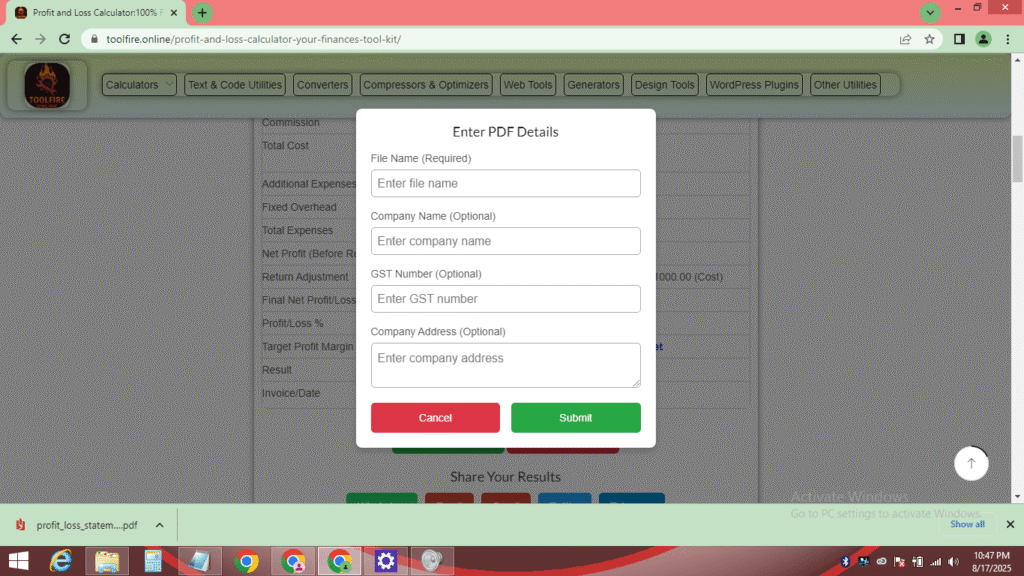
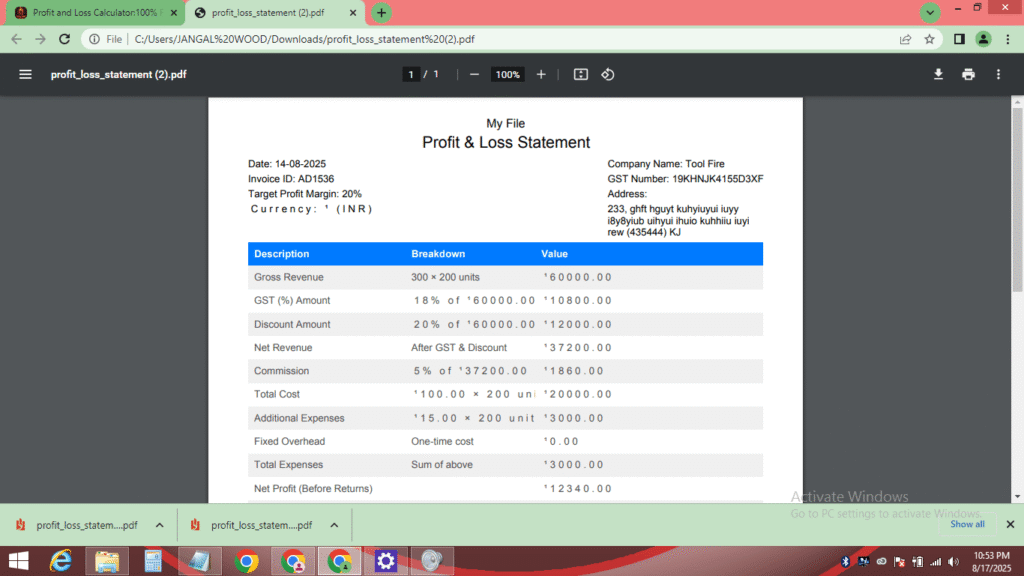
- PDF Export with Customization: Download results as a professional PDF with optional company details like name, GST number, and address.
- Share Results Easily: Share your calculations via WhatsApp, Email, Gmail, Twitter, or Telegram for quick collaboration.
- Responsive and User-Friendly Design: A clean interface with a built-in calendar for date selection ensures ease of use.
These features make this easy profit loss tool a must-have for anyone needing quick and reliable financial insights. For more tools to boost productivity, visit About.me to discover professional resources.
How to Use the Profit and Loss Calculator
Using this free online profit and loss calculator is straightforward, even for beginners. Follow these steps to calculate business profit:
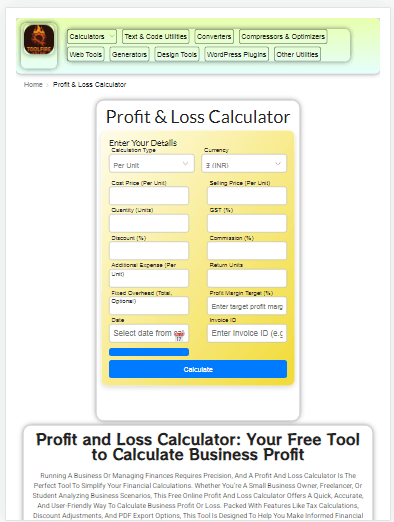
- Select Calculation Type: Choose “Per Unit” for individual item calculations or “Total Project” for overall project analysis.
- Choose Currency: Select your preferred currency (e.g., ₹, $, €, £) from the dropdown.
- Enter Core Details: Input cost price, selling price, and quantity (if per-unit mode).
- Add Adjustments: Include GST/tax, discounts, commissions, additional expenses, and return units/rates as needed.
- Set Optional Fields: Add fixed overheads, profit margin targets, invoice ID, and select a date using the calendar.
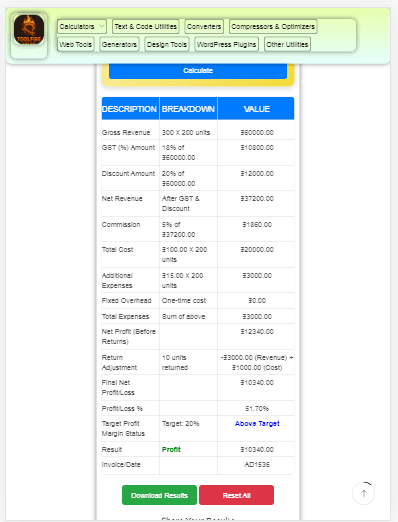
- Calculate: Click the “Calculate” button to view a detailed table with gross revenue, net profit, and profit/loss percentage.
- Review Results: The table highlights whether you’ve made a profit, loss, or broken even, with color-coded indicators (green for profit, red for loss, orange for break-even).
- Download or Share: Save results as a PDF by entering file details or share via social platforms like WhatsApp or Twitter.
For a visual guide on using financial tools, check out tutorials on YouTube to enhance your skills.
Who Can Benefit from This Calculator?
This financial Calculator is versatile and caters to a wide audience:
- Small Business Owners: Calculate profits for products or services to optimize pricing strategies.
- Freelancers and Entrepreneurs: Assess project profitability with ease, factoring in commissions and taxes.
- Students and Educators: Use it for business studies or financial analysis assignments.
- Retail and E-commerce Sellers: Track per-unit profits while accounting for returns and discounts.
- Accountants and Financial Analysts: Perform quick calculations without relying on heavy software.
- Startups and Solopreneurs: Monitor cash flow and set realistic profit targets for growth.
Whether you’re a beginner or a seasoned professional, this calculate Business Tools simplifies financial analysis. For networking and business tips, connect with professionals on Facebook.
Tips for Maximizing Your Profit Calculations
- Double-Check Inputs: Ensure accurate cost and selling prices to avoid errors.
- Use Profit Margin Targets: Set realistic goals to track performance effectively.
- Save PDFs Regularly: Download results for record-keeping or sharing with stakeholders.
- Leverage Sharing Options: Use the share feature to collaborate with team members or clients.
- Explore Currency Options: If dealing with international transactions, select the appropriate currency for clarity.
Conclusion
The Profit and Loss Calculator is your go-to free online profit and loss calculator for quick, accurate, and hassle-free financial analysis. Whether you’re calculating business profit, assessing project viability, or tracking sales, this easy profit loss tool delivers results in a user-friendly format. With features like PDF export, multi-currency support, and social sharing, it’s perfect for businesses and individuals alike. Try it today and take control of your financial decisions!
Keywords: Profit and Loss Calculator, free online profit and loss calculator, calculate business profit, easy profit loss tool, online profit calculator.
Related Searches; Global Tax, GST & Discount Calculator , Loan EMI Calculator, Percentage Calculator
Why Choose This Free Profit and Loss Calculator?
Unlike other tools, this calculator stands out for its simplicity and powerful features. It’s completely free, requires no sign-ups, and offers instant results. The ability to export results as a customized PDF makes it ideal for professional use, while sharing options ensure easy collaboration. Its mobile-friendly design means you can calculate on the go, and the inclusion of advanced inputs like returns and overheads ensures accuracy for complex scenarios.